HyperTab
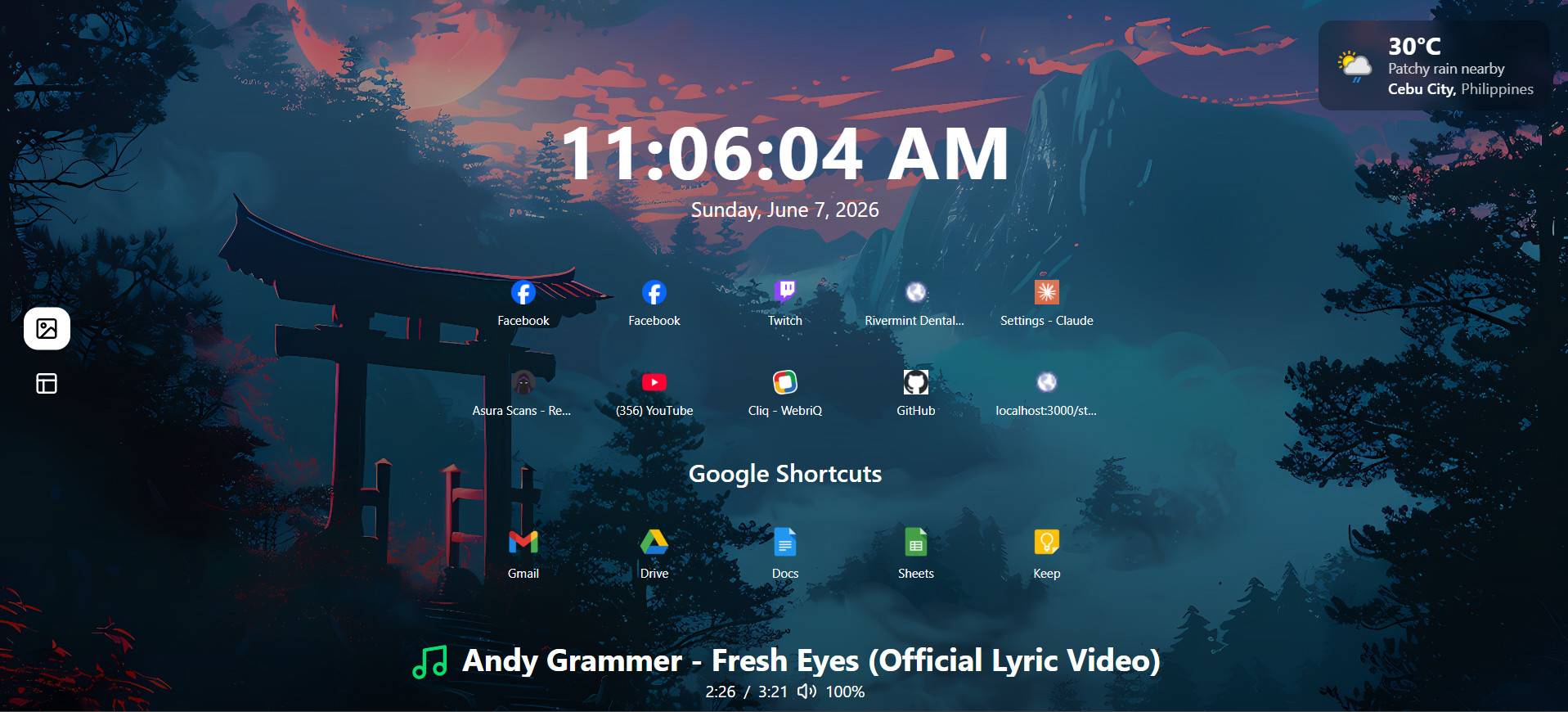
A Chrome extension that replaces the new tab page with a customizable dashboard, with wallpapers, widgets, a YouTube now-playing bar, and a content scraper that tracks sites for updates.
 Typescript
 Tailwind CSS
 ShadCN
HyperTab is a Chrome extension that replaces the default new tab page with a dashboard built entirely around how you actually browse:
- Customizable layout: clock, top sites, Google shortcuts, and custom wallpapers.
- YouTube now-playing overlay: a live bar that shows the current video’s title, progress, and volume from your active YouTube tab.
- Content scraper for updates: watches chosen sites (like manga and anime pages) using CSS selectors, checks them on a schedule, and notifies you when the DOM changes.
Why it exists
Opening new tabs dozens of times a day felt like wasted real estate. Instead of a static default page, HyperTab turns that muscle-memory action into something useful: surfacing what you care about and quietly handling the manual checks you used to do yourself.
The project started from a simple annoyance: repeatedly checking the same manga and anime sites for updates, while also wishing the new tab page looked as good as the aesthetic setups seen in screenshots online. HyperTab is the answer to both.
How it’s built
- Inside Chrome’s extension model: It uses service workers, content scripts, and Chrome’s storage APIs, wiring background processes cleanly into the UI instead of behaving like a typical React web app.
- YouTube now-playing overlay: A content script polls the active YouTube tab for playback state and relays it through the background worker to the dashboard, requiring careful message passing to keep it smooth and responsive.
- Content scraper: Given a set of CSS selectors, it periodically inspects target pages for DOM changes and fires browser notifications when something new appears.
What makes it different
- It replaces a habit, not just a page: HyperTab doesn’t just look nicer; it removes the need to manually check sites, folding that behavior into a place you already open constantly.
- Designed from real daily use: Every feature exists because it solved a personal, recurring need. If it wouldn’t be used every day, it didn’t ship.
- A true extension, not a webview wrapper: It leans into Chrome's extension architecture (service workers, content scripts, manifest permissions) rather than simply embedding a website.
Key takeaway
HyperTab is a reminder that the most sustainable projects often start from irritation with your own habits. Building something you genuinely use every day keeps motivation high long after the initial novelty fades, and that's the kind of project worth repeating.